


Wishlist Maker - Listful
4.671.00 Reviews
App Specs
- Version
- 1.17.0
- Updated On
- License
- Free
- Downloads
- 100,000+
- Developer
- Listful
- Categories
- Lifestyle
- Platform
- Android
Screenshots
 Analysis by AppCompare
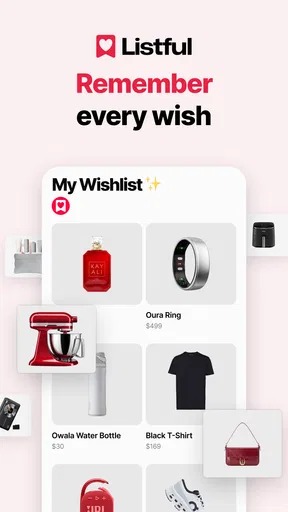
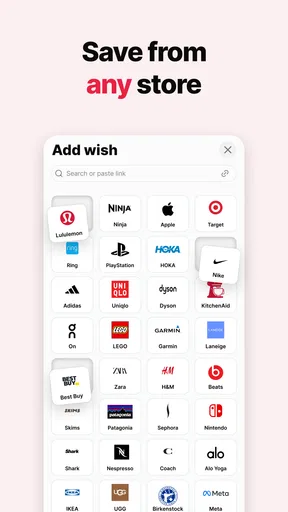
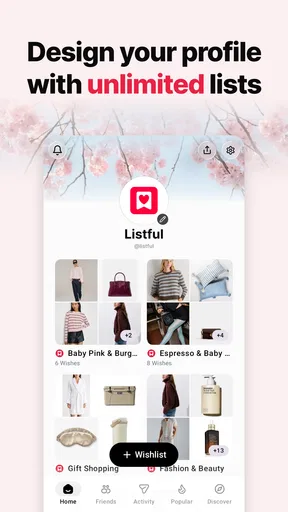
If you have ever sent someone a product link and then had to explain the color, size, or store all over again, Wishlist Maker - Listful takes a more organized approach. It is a lifestyle app from Listful for collecting gift ideas and sharing them through one wishlist. I found the basic idea easy to understand: save things from different shops, keep them together, and give other people a single place to browse.
That simplicity is the main reason I would recommend trying it. This is not an app designed to replace a full shopping service, and it does not try to turn gift planning into a complicated project. Instead, it focuses on the awkward middle ground between “I might want this someday” and “someone is asking what I want.” The free download makes it easy to test, while optional in-app purchases ranging from $9.99 to $29.99 per item mean you should pay attention before choosing anything that costs money.
What it feels like to use Wishlist Maker - Listful
On my first pass, I treated the app as a personal collecting space rather than a shopping cart. That distinction matters. A shopping cart usually means I am close to buying something, while a wishlist can contain ideas I want to remember, gifts I would enjoy, or items I want to show family before a birthday or holiday. Listful fits that second situation particularly well.
The store describes it as a wishlist maker and gift registry, but the useful part is how those two purposes overlap. I can save an item because I like it, then later share it when somebody asks for suggestions. I do not have to rebuild the list from memory or search through old messages for links.
The app is free to install and suitable for Everyone, which makes it approachable for households where several people may need to view or contribute ideas. It runs on Android 8.0 or later. On Android, that minimum requirement is broad enough to include many older devices, although the experience will naturally depend on the phone and its current software.
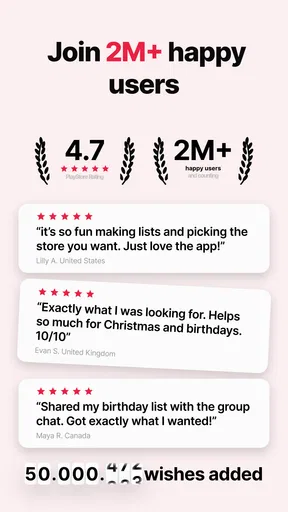
Listful has reached over 100 thousand installs and carries a 4.6 average from around 1.9 thousand ratings. I see that as a useful sign that the central workflow is appealing, but I would not treat the rating as proof that it will suit every kind of list. People who want detailed budgeting, inventory control, or a marketplace may find the app narrower than those numbers suggest.
The best way to judge it is to complete one small wishlist before trying to organize every gift idea you have. That first success tells you whether saving and sharing links feels more convenient than your current method.
Worth Reading Before You Choose

Flipboard Shows What News Apps Must Do Beyond the Feed

Switching to Android Auto Means Rethinking Your Driving Routine

Google Calendar Makes a Crowded Week Easier to Manage

Ludo King Makes the Most of the Minutes Between Plans

Baby Panda World Brings Quick Play to Modern Phones, but Its Game Library Feels Busy

ESPN’s Live Game View Makes Following Close Games Easier
Who will get the most from it
I think Listful is strongest for people who regularly receive the same question: “What would you like?” It is also useful for parents managing children’s gift ideas, couples preparing shared lists, and friends arranging presents without repeatedly forwarding individual product pages.
A practical example is a family preparing for a birthday. Instead of sending five separate messages with different links, I could collect the ideas in one place and share the list. The recipient can browse at their own pace, while I avoid explaining which item is the preferred option each time somebody asks.
It can also help with less seasonal situations. I might save a kitchen tool after seeing it in a shop, add a book recommendation later, and keep both available for a future occasion. That turns casual discovery into a usable record rather than a pile of browser tabs.
I would be more cautious if your main goal is strict spending control. Listful is centered on wants and gift coordination, not on managing a detailed household budget. Likewise, if you need a shared project board with assignments, deadlines, and extensive notes, a productivity app may be a better fit.
Getting started without overcomplicating the first list
After installing the app, I would resist the temptation to create a huge collection immediately. Start with one clear purpose, such as “birthday ideas” or “things for the new apartment.” A focused first list makes it easier to see whether the app’s organization matches the way you actually think about gifts.
The developer is Listful, and the current version is 1.17.0. Those details are worth checking in the app store before installation, especially if you are using an older phone. The application is free to begin with, but the presence of in-app purchases means I would look carefully at any upgrade screen rather than tapping through automatically.
My suggested setup routine is simple:
Choose one upcoming occasion or one personal theme for the first list.
Save a small number of items from different stores instead of adding everything at once.
Review each saved item while the reason you wanted it is still fresh.
Share the list only after removing ideas you no longer care about.
This approach exposes the app’s real value quickly. The point is not merely to store links; it is to turn scattered product discoveries into a list another person can understand.
Making the first saved item useful
The first meaningful action should be saving an item you genuinely expect to mention to somebody. Pick something you have recently found in an online store, then place it in your list rather than saving a random product just for testing. Once it is there, read the entry as if you were the person receiving the shared list.
Can you tell what the item is? Would you remember why you saved it? Is it still something you would be happy to receive? This quick inspection is more valuable than filling the list with dozens of links. A wishlist becomes helpful when each entry reflects a real preference, not when it simply becomes a storage bin.
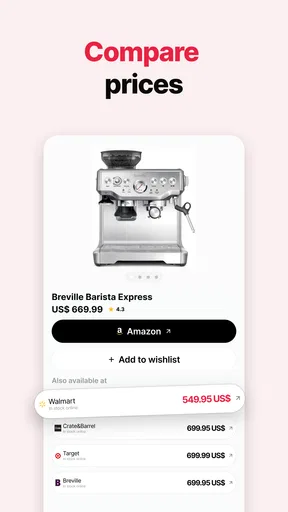
One advantage of collecting items from different stores is that your list does not have to follow one retailer’s catalog. That is particularly handy when one shop has the style you like, another has a better selection, and a third carries a very specific item. The trade-off is that your list may need more personal checking because product details, availability, and variants can differ from one store to another.
I would also avoid assuming that saving a product means reserving it. A wishlist communicates interest; it is not the same as placing an order. Before sharing a list for a time-sensitive event, I would revisit the entries and remove anything that has become irrelevant or difficult to find.
Why the one-link approach changes gift conversations
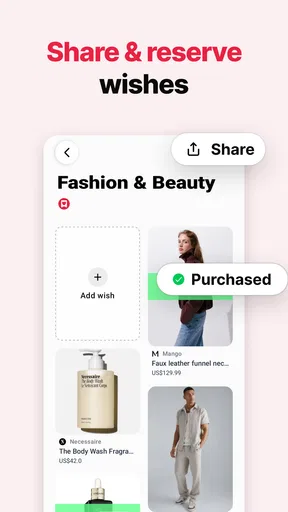
Sharing one link sounds like a small convenience, but it changes the conversation around gifts. Instead of acting as a messenger between several product pages, I can point people to a single destination and let the list explain my preferences. That reduces repeated questions and makes it easier to update my suggestions in one place.
There is also a social benefit to keeping several ideas together. A recipient can choose according to their budget or availability without asking me to generate a new suggestion. I still need to be considerate about how many options I include: a long, unfiltered list can feel like homework, while a short selection feels more intentional.
For that reason, I would create separate lists when the audiences are different. A private collection of future purchases should not necessarily be the same as a birthday registry shared with relatives. Keeping those purposes distinct makes the shared link clearer and prevents old ideas from distracting people.
Small points that may confuse first-time users
The biggest possible confusion is the difference between saving an item and completing a purchase. Listful helps organize product ideas, but I would still verify the final product page before buying. Price, size, color, shipping, and availability can change outside the wishlist itself, particularly when items come from different stores.
Another point is that “share in one link” does not mean every recipient will understand your preferences automatically. If an item has several versions, I would add enough context through the available listing information or choose the exact variant carefully before sharing. A vague entry can create the same back-and-forth that the app is meant to reduce.
There is also a practical privacy consideration. A wishlist can reveal more than a person expects, especially if it includes expensive items, children’s products, or plans for a particular event. I would review the list from a visitor’s perspective before sending it to a broad group. Share the list with the people who need it, not automatically with everyone in your contacts.
The optional purchase model deserves a calm look as well. Since individual in-app purchases are listed between $9.99 and $29.99, I would first use the free experience to decide whether the workflow solves a real problem for me. Someone who only needs a short birthday list may not need to pay for anything, while a frequent registry user may decide that an upgrade is worthwhile. The right choice depends on how often you use the app and what the paid option actually unlocks at the moment you see it.
I would not install this expecting a universal catalog of every product. Its strength is collecting items from the places where you already shop. That gives the list flexibility, but it also means the quality of the final collection depends on the links and products you choose.
Three workflows that make it more useful
My first tip is to use the app during discovery, not only when an event is approaching. When I wait until the night before a birthday, I usually remember fewer ideas and settle for whatever is easiest to find. Saving items as I encounter them creates a more natural list and reduces last-minute searching.
My second tip is to separate “I want this” from “this would make a good gift.” Those are not always the same thing. A personal wish can be too specific, too expensive, or too difficult to purchase. A gift-friendly list should contain choices that another person can understand and act on without needing a long explanation.
My third tip is to maintain the list like a recommendation, not an archive. After an occasion passes, remove items that no longer matter. If I leave every old idea in place, the one-link convenience gradually turns into clutter. A shorter list is easier for someone else to browse and more likely to produce a useful gift.
A fourth workflow is helpful for shared households: create the list before discussing individual presents. If everyone adds ideas independently, the conversation begins with options rather than pressure. I would still check with the intended recipient when a gift is personal or size-sensitive, but the list can handle the routine suggestions.
How it compares with familiar alternatives
The usual alternative is a note-taking app. Notes are quick, flexible, and already familiar, but they often require manual formatting. I might paste a link, type a description, add a reminder, and then repeat that process for every item. Listful is more purpose-built for the transition from saved product to shared wishlist, so it should feel cleaner when the main task is gift planning.
Another alternative is bookmarking products in a browser. Bookmarks work well for private research, but they are not always pleasant to hand to relatives or friends. A browser folder can become a technical collection of pages rather than a readable gift guide. Listful’s focus on a wishlist and registry gives the collection a more direct purpose.
Retailer-specific wishlists can be excellent when I buy everything from one store. They may be the better option if I want the retailer to manage stock, checkout, or purchase-related details. The drawback is that separate retailer lists fragment my ideas. Listful makes more sense when my choices are spread across multiple shops and I want one shared destination.
Dedicated registry services may offer more specialized event tools, especially for formal occasions. If I am organizing a large ceremony or need extensive event management, I would compare those services carefully. Listful is more appealing for everyday wishlists, informal gift exchanges, and personal collections where speed matters more than a large administrative system.
In short, the app occupies a useful middle position. It is more presentable than a raw note or bookmark folder, while remaining less involved than a full event-planning platform. That balance is its main appeal, but it also defines its limits.
When I would skip it
I would skip Listful if I rarely save products, never share gift suggestions, or already have a retailer-specific system that works perfectly. Adding another place to maintain information is not automatically an improvement. The app pays off when scattered links and repeated gift questions are a regular annoyance.
I would also look elsewhere if I need detailed purchase tracking. A wishlist is useful before a purchase, but it does not replace a personal finance tool or a comprehensive order manager. Similarly, people who want extensive written reviews, collaborative comments, or complex project controls should choose a service built around those tasks.
Finally, I would be careful about paying before establishing a habit. The free starting point is enough to answer the most important question: do I actually save and share ideas more consistently here than I did before? If the answer is no, a paid option will not fix the underlying lack of use.
My recommendation after testing the complete path
For a first-time user, I would begin with one list, add a few genuine items from different stores, inspect every entry, and share it with one trusted person. That sequence gives you a meaningful result without requiring a large setup. If the recipient can browse your ideas without asking where each item came from, the app has already solved its central problem.
My overall opinion is positive because Listful addresses a very ordinary frustration in a focused way. It gives saved products a clearer home than browser tabs and makes mixed-store suggestions easier to pass along than a string of messages. The experience is most convincing when a real occasion is approaching and several people need ideas quickly.
At the same time, I would keep expectations realistic. It is not a universal shopping manager, a budgeting system, or a replacement for an elaborate event registry. Product details still deserve a final check, shared lists still need editing, and optional purchases should be considered only after the free workflow proves useful.
With a 4.6 average and over 100 thousand installs, Wishlist Maker - Listful looks like a practical choice for people who want a simple, shareable place for gift ideas. I would recommend it to anyone tired of repeating product links, especially families and friends who exchange gifts regularly. I would not recommend installing it merely because every app needs a wishlist; install it when you have a real list to build, and let that first shared link decide whether it belongs in your routine.
Pros
- Simple interface makes creating and organizing wishlists quick.
- Useful for tracking gift ideas
- purchases
- and personal goals.
- Items can be grouped into separate lists for easier planning.
- Sharing lists can help friends and family choose suitable gifts.
- Lightweight design is easy to use on most modern devices.
Cons
- Some advanced sharing or collaboration options may be limited.
- The app may require manual updates when item prices change.
- Product availability can vary depending on the linked store.
- Large wishlists may become harder to manage without extra filters.
- Privacy settings should be checked before sharing personal lists.
FAQs for Wishlist Maker - Listful
What is Wishlist Maker - Listful used for?
Wishlist Maker - Listful is designed to help you create, organize, and share wishlists in one convenient place. You can add products, gift ideas, experiences, or personal goals and keep them grouped for different occasions. It can be useful for birthdays, holidays, weddings, shopping plans, or simply saving things you may want to buy later.
How do I add items to a wishlist in Listful?
After creating or opening a wishlist, you can usually add an item by entering its name, description, price, image, and product link. Depending on the app version and device, you may also be able to save items while browsing through a sharing option. It is worth checking the item details before saving, especially if the price or availability may change.
Can I share my Wishlist Maker - Listful lists with other people?
Yes, sharing is one of the main purposes of a wishlist application such as Listful. You can share a list with friends, family members, or guests through an available link or supported sharing method. Before sending it, review the list’s visibility and privacy settings, since some lists may contain personal preferences, private notes, or items intended to remain confidential.
Is Wishlist Maker - Listful free to download and use?
The app may be available to download at no initial cost, but some features can depend on the current version, platform, or account plan. Additional options may include advertising, optional purchases, premium organization tools, or expanded sharing capabilities. We recommend checking the app store listing for the latest pricing, subscriptions, and in-app purchase information before committing to any paid feature.
Does Listful guarantee that wishlist items will remain available or keep the same price?
No wishlist app can normally guarantee that products will stay in stock, remain listed, or keep their original prices. Listful serves as a place to organize and share saved ideas, while product availability depends on the external retailer or website. Before purchasing, open the original product link and confirm the current price, shipping details, seller information, and return policy.


